Scheduler
The Scheduler Module of Church Windows is a program that will allow you to schedule meetings or events. Some of the functions of the Scheduler Module include:
- Record details for each event such as: date, time, Locations, Categories, Equipment needed, and People involved.
- Links to The People File in the Membership Module to assign people Duties for the scheduled meetings or events.
- View events in various ways, such as View by Equipment or View by Person.
- The program will also notify you of Conflicting Events, such as when needed equipment is already scheduled to be used somewhere else.
- Exporting Events to vCal format which can then be imported into Outlook, Palm Desktop and other calendar programs.
Overview of the Scheduler Screen
- From The Initial Portal of Church Windows choose Scheduler
- The Scheduler Main Screen will open as follows:
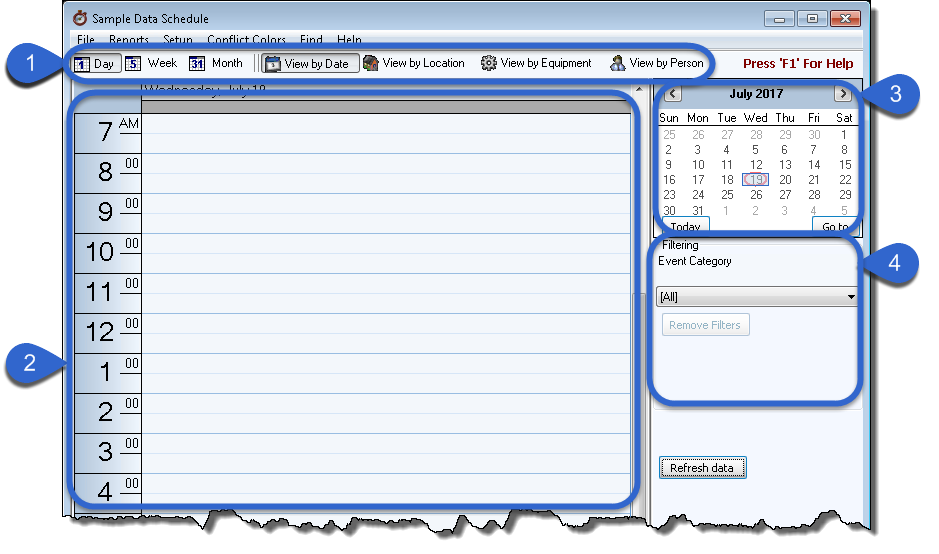
There are 4 sections to the Scheduler Main Screen:
- The bar across the top contains options to choose what you would like to display. You can click back and forth between them to View by Date, View by Location, View by Equipment, or View by Person.
- The left half of the screen is a grid. You can begin Adding a New Event directly on the grid.
- The upper right section of the screen is a calendar. The default view is the current month but you can change this in Scheduler Options. Today’s date will be circled in red on the calendar. If you are on a day or week view, the date(s) being displayed on the grid will be shaded in blue on the calendar.
- The bottom right section of the Scheduler Main Screen is the Filtering section, which allows you to limit the event Categories, Equipment, Locations, or People that appear on the display. The default filter is All.
