Create a CASS/NCOA file
If you are going to be Printing Labels with Barcodes, you need to send your data for CASS Certification and NCOA Processing. The postal service will certify your addresses one time for free, every time after that you need to pay for the service.
Important!
To create a file to have your addresses certified, you (and any other Users) may not have The People File open.
- From The Initial Portal of Church Windows choose either Membership or Donations
- Select Special Functions from the top Button Bar
- Click NCOA
- Choose Create CASS/NCOA file:
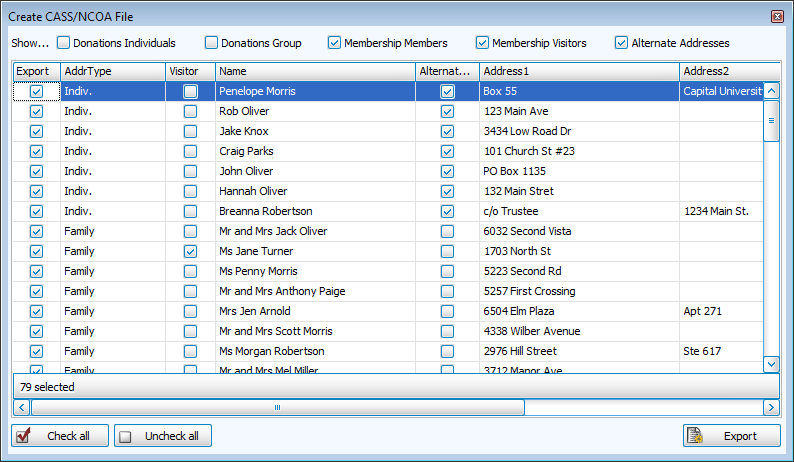
- At the top of the screen, place a
 checkmark next to the kind(s) of information you wish to export.
 - Place a checkmark next to the item in the Export column for each line of information you wish to export.
- Click Check All or Uncheck All to do so in the list of items.
- Click the Export button.
- When the Export to File screen appears, click the
 ellipses button.
 - Choose the location you wish to export your file.
- You can save the file to a folder on your computer and email it.
- Alternately, use removable media (e.g. floppy disk, flash drive).
- Press the Save button.
- The box next to the ellipses button will show you the path and name of the file. (By default, the file will be called uspsconv.csv)
- The file will be saved as a "Comma Separated Value" (CSV) file.
- Click OK and a message will tell you where the file was created and if you would like to open the folder where the file resides.
- If you are emailing Lorton your file, just follow their instructions to send them your uspsconv file.
- Otherwise, transfer the file to a newly created media and label it per the instructions on the Lorton form (usually Input), and take another blank media disk and label it "output " per the instructions.
- Be sure to put your Church name, address and phone number on each piece of media.
- Complete the forms per the enclosed samples.
- Enclose the completed Lorton forms.
Note:
Remember that after you send your data away for processing, any name or address changes that you make before you get your data back will be lost when you restore the output into Church Windows. Please refrain from making name and address changes until after you Import your Output from Lorton or the USPS.
