Advance Groups
The Advance Groups function allows you to move group members from one group or class to another. You might use this process to move people through a series of classes, move Sunday School levels, or combine groups. To advanced the Grades field, use Advance Grades.
If Church Windows is on multiple computers, all other work stations must have the Membership module closed.
Access Advance Groups
To access from the Button Bar, go to Groups/Skills > Advance Groups.

As with any significant change to multiple pieces of data, we strongly recommend you Backup Data before advancing groups.
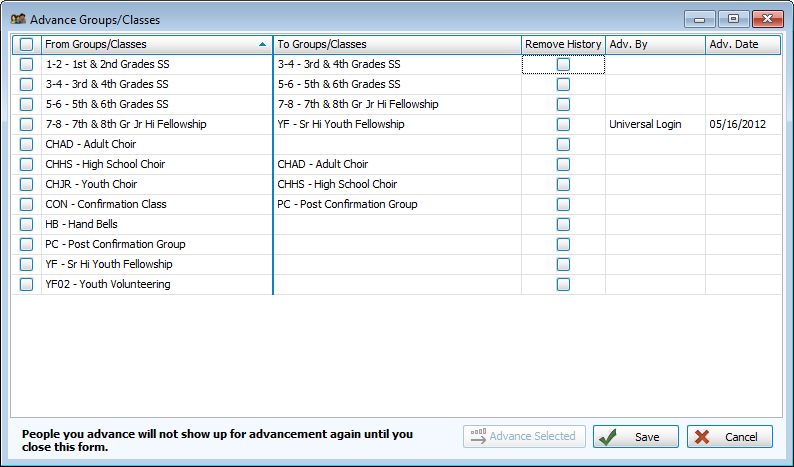
You can determine which groups appear in the advance screen with the Show on 'Advance Groups/Classes screen check box Groups & Classes set up screen.
-
Select the next group or class in the 'To' column.
-
Check Remove History to clear that group from the promoted individual's records.
-
Continue by clicking Advance Selected
-
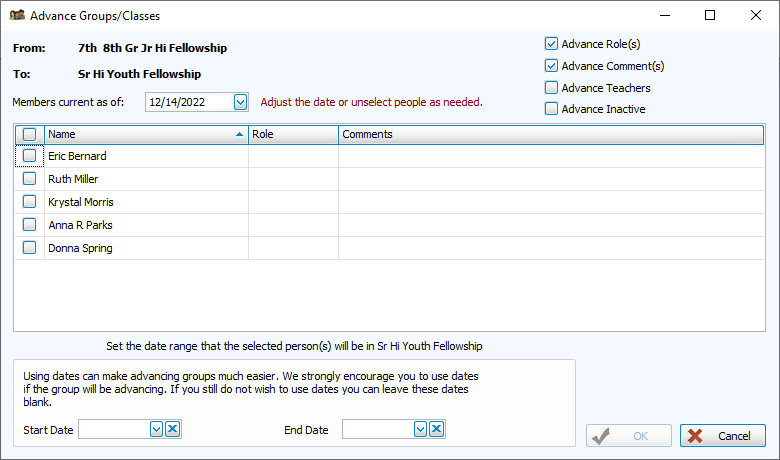
Choose the advancing members.
-
We recommend using start and end dates to track progression through a group or class series.
-
Check boxes in the upper right allow you to carry roles, comments, teachers, and inactive members.