Calculating Group Term Life Taxes
The Calculate Group Term Life Taxes allows easy input of any taxable portion of Group Term Life Insurance. The program will increase the taxable wages, show the amount in box 12 (code C) on the W-2 and calculate the Social Security and Medicare taxes related to the taxable portion of the benefit. For more information, see “Fringe Benefits” in the documents folder that resides in the Payroll installation folder. You can get there by minimizing or closing the Payroll program, right-clicking on the Payroll icon used to open the program, and click "Properties" at the bottom. In this screen you will see a button near the bottom labeled "Open File Location". Click that button and it will open the payroll directory where you will see the Documents folder. This contains the "Fringe Benefits" PDF file as well as other pertinent IRS documents. You can also visit the current publication information on the www. irs.gov/pub15 website.
- Click the Payroll, choose Calculate Group Term Life Taxes.
- Select the calculation date. The default date is December 31 of the current year. Click Next.
- Select the employee(s). Click Next.
- On the Calculate Group Term Life Taxes – 3 screen, enter the amount of taxable income related to the group term life insurance benefit. Select either “Gross-up income (Default)” or “Manually collect from employee.”
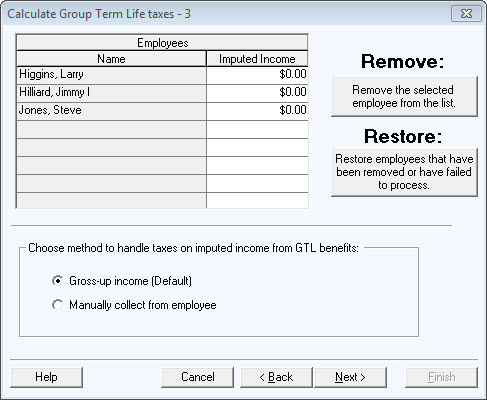
Gross-up income - wages are increased by taxable benefit and the employee share of Social Security and Medicare. The net “check” amount is zero.
Manually collect from employee - wages are increased by the taxable benefit. The program calculates the amount the employee needs to pay for the employee's portion of the related Social Security and Medicare taxes. The employer should collect the amount calculated for each employee.
- If the print preview box is checked the reports will appear on the screen. You can either print them now or later. Click on the Print button or click Next.
- On the Calculate Group Term Life Taxes – 6 screen, post calculations to the employee file. It then proceeds to the Transfer to Accounting function so the correct amount of tax liability is reflected in Accounting.
