Budgets and Budget Projection
Church Windows Accounting provides you with two ways that you can view and adjust your budget amounts. You can use the Budgets screen to manually enter a budget amount for each of the desired accounts. Alternatively, you can use the Budget Projection screen to automatically raise or lower the currently set budget amounts based on a desired percentage of either the previous year's actual Income, or previous year's budget amounts.
 Budgets
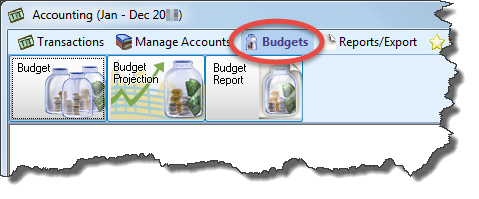
- Access the Budgets screen by clicking the option for it under the Budgets menu in the Button Bar at the top of the screen:
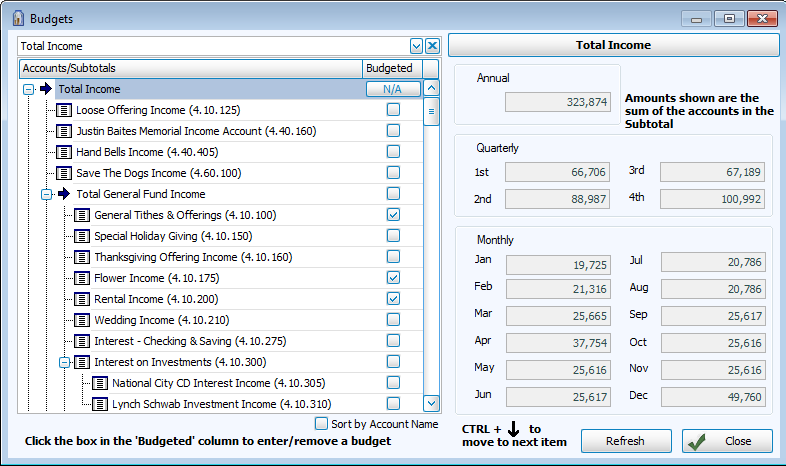
- Accounts / Subtotals
Use the dropdown box or the list below it to locate an account and make changes to its budget amounts. - Sort by Account Name
Place a checkmark in the box to reorder the list.
 - Budgeted
Click the box to place a checkmark and add budgets. Remove the checkmark from the Budgeted box to exclude the account from being budgeted. - Annual, Quarterly, or Monthly
Choose the option that describes the kind of budget you wish to apply.- Enter the amounts in each box made available by the kind you chose.
- To advance to the next account you can either click it, or press the CTRL and ↓ down arrow keys on your keyboard.
- The amounts of the other budget types will adjust according to the amounts you enter.
- Set Amounts to 0
You can click this button to reset all stored amounts to zero (only available for Expense Accounts, not Income). - Refresh the budget content by clicking the button, or click Close to exit.
Budget Projection
If there is a prior year from which to project budgets, the Budget Projection screen will display a list of the Budgeted Accounts and Subtotals and the Prior Year Budget, Prior Year Actual, and Projected Budget amounts that apply to the current and prior Accounting Year.
Note:
While this screen is open you will have exclusive access to editing accounts. No one else will be able to make changes to accounts while you are in this screen.
- Access the Budget Projection screen by clicking the option for it under the Budgets menu in the Button Bar at the top of the screen:
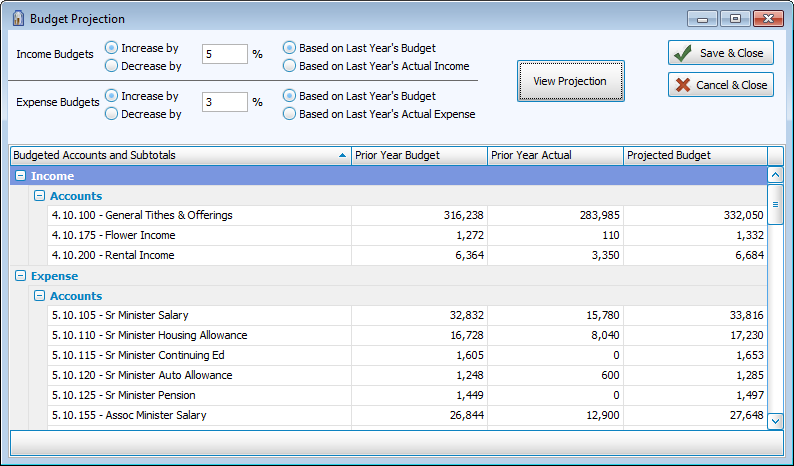
- Use the letter indicators in the image below to follow the instructions for setting up a Budget Projection:
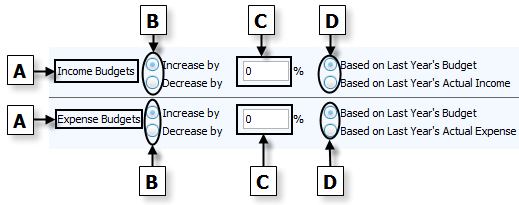
- For each account type (A), make the desired selections to either increase or decrease(B) a budget amount by a certain percentage(C).
- Then choose between adjusting your selections based on (D) either last year's budget or last year's actual Income / Expense.
- Click the View Projection button to apply the selections you made for the Budgeted Accounts and Subtotals.
- Review the Projected Budget and make as many changes to (B), (C), and (D) as needed.
- If you wish to apply the projected budget amounts as the current Accounting Year budget amounts, click the Save & Close button.
- Otherwise, click Cancel & Close to exit without saving any changed information.
After budget amounts have been entered, you can then run a Budget Report to provide a means to review the budget in a format that you can print out, Export to a file, or Send via Email.
