Unposted Batches
A batch of donations being entered can always be saved to be worked on at a later time. Such batches in Church Windows Donations are referred to as unposted batches, which you can find by clicking the Unposted Batches button on the Enter Donations screen:

The Unposted Batches screen is separated into the following columns:
- Date: The date for which the donations in the batch was made.
- Code: The batch code used for the specific batch.
- Total: The dollar amount of all the donations entries in the batch.
- Cash: The portion of the Total that represents donation entries in the batch made in cash.
- Check: The portion of the Total that represents donation entries in the batch made in check.
- # of Entries: The number of donation entries in the batch.
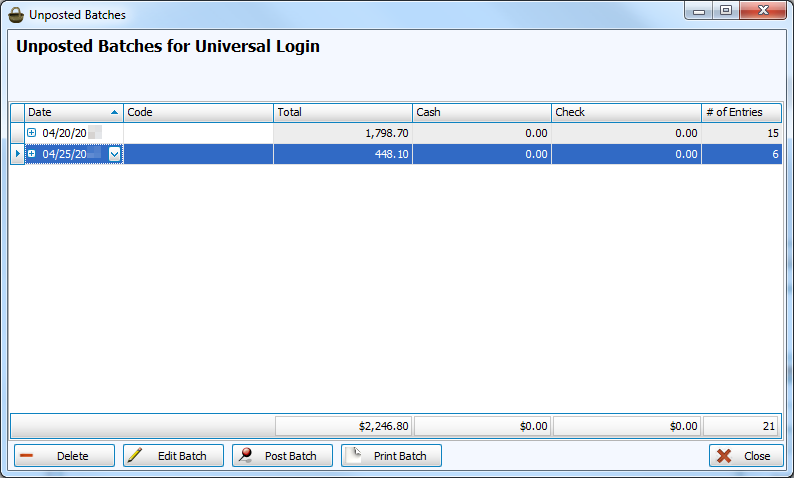
The buttons across the bottom of the screen allow you to perform the following tasks:
- Select any desired batch you wish to delete and click the Delete Batch button.
- To make changes to the entries in the batch, select the desired batch and click Edit Batch. The batch with all its entries in the batch will reappear at the bottom portion of the Enter Donations screen, labeled Unposted Donations Batch. From there you can choose any of the entries and edit the information as needed.
- If you decide that the batch information is correct and would like to post it, click to select the desired batch and click the Post Batch button.
- If you need to print the unposted batch, click to select the desired batch and click Print Batch.
Click the Close button when you are finished using the screen.
