Mass Editing Area Codes
A very common use of the
Mass Edit function is to change area codes for phone numbers, since many area codes are changing around the country. To Mass Edit area codes:
- To have Church Windows touch every record during its search Using the Find Function, perform a search without entering any criteria to display all records in The Find Grid.
- For Church Windows to change information in only a certain group of records, then enter criteria to get that certain group displayed in The Find Grid.
- Alternatively, if you would like to change the area code for only certain households regardless of their original area code, then you can select the specific records to change from The Find Grid list using
 checkmarks.
 - Then click the Mass Edit button
- In the Field box, click the down arrow and select Phone (family):
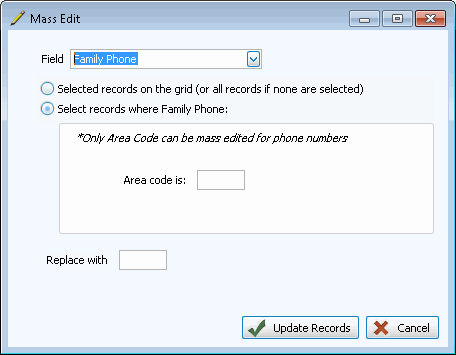
- Place the
 radio button next to Select records where...:.
 - In the Select records where...: box, type in the current area code. (Ex: 614)
- In the Replace With box, type in the new area code with NO asterisk. (Ex: 740)
- When you are ready, click Update Records to begin the Mass Edit.
- The system will confirm the changes you are about to make and ask if you would like to continue with the Mass Edit. Answer Yes to continue, No to stop the Mass Edit.
- If you answer Yes, then the system will make the changes, and then give a message letting you know how many records it has changed.
- If you click OK on this message, then the Mass Edit will be completed and the records will be changed.
- If you click Cancel on this message, then the system will not complete the Mass Edit and the changes will not be made.
- If you click OK on this message, then the Mass Edit will be completed and the records will be changed.
- Performing the
Mass Edit in this way will change the area code for every family whose area code is 614.
