About Payroll
Navigation

Open Payroll from the Initial Portal of Church Windows.
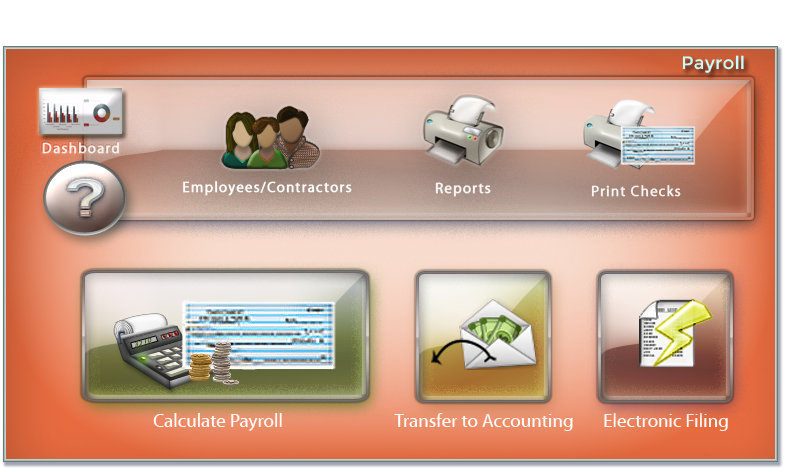
From the opening screen, you can use the Quick Access Buttons in the center to shortcut over to some of the more popular areas of Payroll. Along the top menu bar, select the Initial Payroll Setup, Calculate Payroll, Payroll Reports, Direct Deposit/EFT, Electronic Filing, or Payroll Settings menus. Making a selection will display that menu on the Button Bar.
 Data Setup

Employee and contractor files with contact information, pay rates, hours, and direct deposit settings are located here.

Setup and manage departments.

Setup and manage types of pay such as regular, overtime, or vacation.

Create and manage payroll allowances.

Create and manage payroll deductions

Create and manage miscellaneous tax withholdings.

Create and manage local tax withholdings.

Enter Federal and State Unemployment Tax rates.
Payroll

Calculate Payroll to produce pay checks and/or EFT files.

Use this to adjust and correct payroll.

Create bonus checks or deposits.

Use this to enter Group Term Life benefits.

Post Group Health benefits.

Print or reprint checks from a posted payroll.

Reverse a payroll entry.

Reverse a payroll correction.
Reports/Export

Payee Reports provide information about employees and contractors.

Pay Reports provide information about payroll history and totals.

Check Reports allows for check printing, reprinting and viewing the check register.

Tax reports provide information on tax tables, FUTA and SUTA reports, and tax forms.

Link to official Internal Revenue Service website.

Link to official Social Security Administration website.
Direct Deposit/EFT

Enter information for the employer to complete EFTs.

Create a file to upload to your bank for a direct deposit from a posted payroll.

Verify and confirm EFT setup.

Create a duplicate file from a previously generated EFT.

Reverse an EFT transaction.

Provide a form for employees to authorize direct deposit.
Electronic Filing

Print tax forms or file electronically.
Special Functions

Change settings and preferences for the Payroll module.

Correct misassigned check numbers.

Transfer payroll data and expenses to the Accounting module.

Archive employees and contractors no longer on payroll.