EFT Setup
The EFT Setup window allows you to complete your organization's side EFT settings. Employee's direct deposit information and setup is done in their Employees & Contractors Files.
Access Electronic Funds Transfer Setup
To access from the Button Bar, go to Direct Deposit/EFT > EFT Setup

EFT/ACH Info
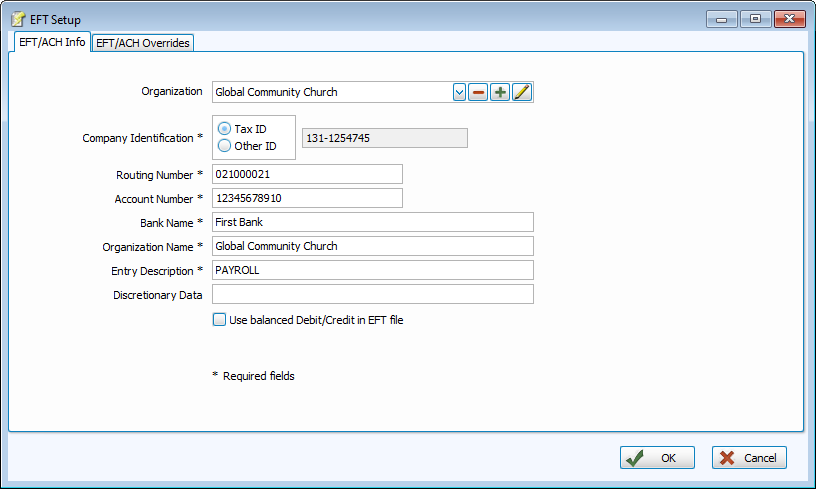
Company
ID #
This is a 10-digit number that the bank uses to identify the account from which to draw the funds. Many banks use the customer's Federal identification number, preceded by a "1." If "Use Tax ID" is selected, then this number will be filled in automatically. If the bank identifies your account in another manner, your bank will provide you with the number to use here. If this is the case, then select "Use Other ID" and type the number into the "Company Identification #" field.
Routing Number
Enter the routing number of the checking account that you will be using to pay your employees. Check with your bank if you are uncertain of the number.
Account Number
Enter your bank account number. This is a required field if your bank requires a balanced file.
Bank Name
Enter the name of your bank (up to 23 characters long). Some banks require that this information be in all capital letters.
Organization Name
Enter your organization name here, which can be your church name (up to 23 characters in length). This is the name displayed on the employee's bank statement identifying the deposit. Some banks require this information in all capital letters.
Entry Description
This is a description of the type of transaction (up to 10 characters) such as "Payroll" that may appear on the employee's bank statement. Some banks require this information in all capital letters.
Optional Data
This is an optional field for further identification (up to 20 characters).
Balanced Debit/Credit Entries in EFT File
If your bank requires a balanced file, click in the box.
EFT/ACH Overrides

Although the defaults are set up for the most commonly accepted file types, your bank may requires specific data or titles for their system. Your bank will provide guidance if anything here needs to be overridden.
Immediate Destination
This is the routing number of the ACH Operator or Receiving Point.
It is 10 characters starting with a blank then, four digits for the Federal Reserve Routing Symbol, followed by four digits for the ABA Institution Identifier and lastly, the check digit.
Immediate Origin
This is the routing number of the ACH Operator or Sending Point.
Originating DFI
This is the routing number of the DFI originating the Entries within the batch.
Company Name
This is descriptive of the source of the entry and use the name by which the originator is known.
Receiving DFI
This is a standard routing number assigned by Accuity to identify the DFI in which the Receiver maintains his or her account or a the number assigned to a Federal Government agency by the Federal Reserve.
Originating DFI
This contains the name of the Origination DFI.