Payroll Departments
Departments allow you to categorize employees. You can use these categorizations to filter employees and create reports.
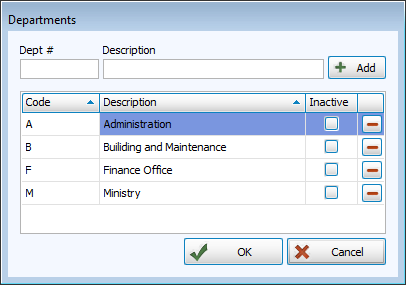
Access Departments
To access from the Button Bar, go to Data Setup > Departments

To access from the Employees/Contractor Files, click  next to the Department drop down field.
Manage Departments
Add a New Department
-
Enter a short code and description and click
 .
. -
Click
 .
.
Edit a Department
-
Click in the line you want to edit and make changes.
-
Click
.
Make a Department Inactive
Making a code department keeps the code in places where it's already been entered, but changes the text to red.
-
Check the box in the Inactive column.
-
Click
.
Remove the check mark to make the code active again.
Delete a Department
-
Highlight the name of the department to delete.
-
Click
 .
.If there are payees in that department, you will not be able to delete it, but you can mark it as Inactive.
-
If the department is empty, confirm the deletion.
-
Click
.