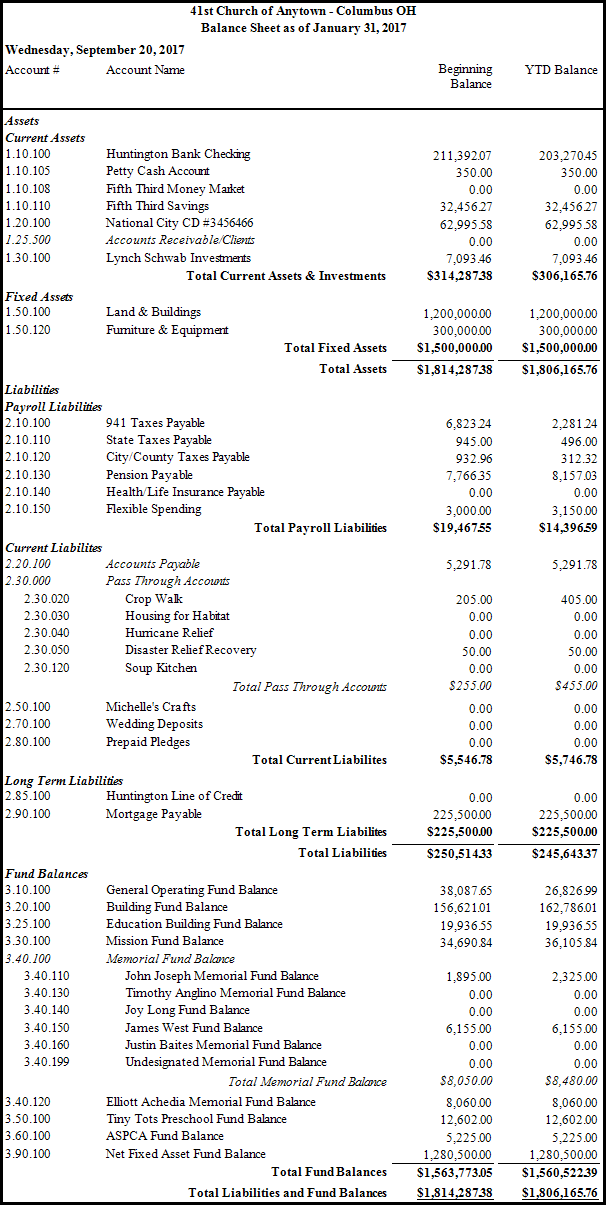
Balance Sheet
Use the Balance Sheet report to pull up a summary of the value of all Assets, Liabilities, accounts payable / vendors, and Funds balances showing the organization's condition on a specific date.
To view or print the Balance Sheet:
-
Click Reports/Export in the Button Bar.
-
Click the Financial button and a menu will show the option for Balance Sheet.
-
Click Balance Sheet option.d
-
Accounting Year - Choose the desired year from the dropdown box.
-
Balances
Select a month from the drop down or choose as of a specific date
-
Mark the Truncate Cents checkbox to show dollar amounts without a decimal point.
-
Include...
Check Accounts with Zero Balance on the report to include accounts
-
Format
Monthly Comparative - shows period information for the selected month
Annual Comparative - shows information for the entire year
-
Other Settings
Custom Account Groups - Display a selection of accounts or create a new group of accounts
Columns - Select the information to display
Detail - Show or hide any of the balances of Subtotals
Fonts - Change the size and style of font in the report

Once you have made all of your selections, click Print to view a Print Preview and then proceed in sending the file to your printer. You can also Exports most reports and/or Send via Email as a file to be used outside of Church Windows.
 Example Balance Sheet