About Donations
The Donations module focuses on the giving your church receives. In this module, you'll be able to enter your donations and credit your members and donors. Whether that's a one time donation or a part of fulfilling a pledge, you'll be able to keep track of where giving is designated. This entry system allows you to accurately record donations and quickly produce quarterly and annual donation statements. You'll also be able to use this history analyze giving trends and patterns, and produce comparative reports.
Navigation

Open Donations from the Initial Portal of Church Windows.
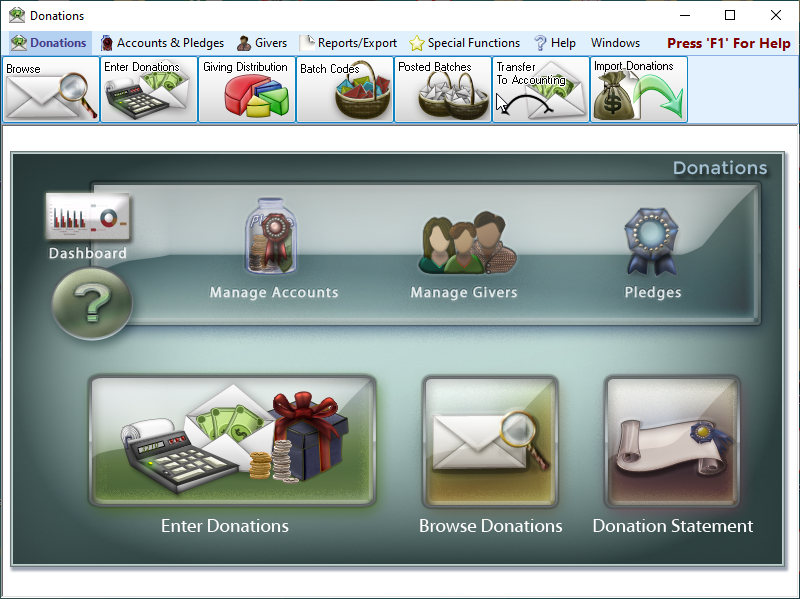
From the opening screen, you can use the Quick Access Buttons in the center to shortcut over to some of the more popular areas of Donations. Along the top menu bar, select the Donations, Accounts & Pledges, Givers, Reports/Export, or Special Functions menus. Making a selection will display that menu on the Button Bar.
 Donations

Your records are located here. You'll come here to add or look someone up.

Find displays people in a grid format allowing you to browse lots of records or make mass edits.

This allows you to track and schedule visits and follow ups with your members.

This tool allows you to move records housed in Membership to instead be housed in Donations.

This tool allows you to move records housed in Membership to instead be housed in Donations.

This tool allows you to move records housed in Membership to instead be housed in Donations.

This tool allows you to move records housed in Membership to instead be housed in Donations.
Accounts & Pledges


Review, add or edit giving accounts.

Create a new giving account with details and accounting links.

Set a sort order for giving accounts.

Manage campaigns and enter pledges.

Create groups of accounts and subtotals for related giving accounts.
Givers

View all records and Donations functions for givers.

Add a Membership or Donations record.

Add a Donations groups

Reassign donation(s) from one person to another.

Review, edit and assign Giver or Envelope numbers individually.

Assign numbers to selected givers in mass.

Transfer Donations Records to Membership
Move records only in Donations to the Membership module.
Reports and Export

Donation Reports include the Donation Log, Giving Summary, and Deposit Slip.

Comparison and Analysis reports include Pledge/Giving Analysis, Campaign Comparison, Giving Comparison, Step Report, and Statistical Report

Lists & Labels
Lists and Labels offer List Account Balances, List Giver Numbers, and Labels.

Generate and send giving statements

Email individuals or groups
Special Functions

Set up individual and module preferences.

Link Giving Accounts to the Chart of Accounts

Bulk mailing functions and settings.

The dashboards provides visual representation of summarized data.

Delete Historical Donations Data
Erase historical donation data