Subtotals
Subtotals allow you to group related accounts together to get quick subtotals of connected funds. For example, you might have a building fund, an organ fund, and a kitchen remodel fund. Using subtotals you can quickly generate reports showing the individual balances and in hierarchies of subtotals.
These can be viewed and selected in the report, List Account Balances
Access Subtotals
To access from the Button Bar, go to Accounts & Pledges > Subtotals

Create and Arrange Subtotals
-
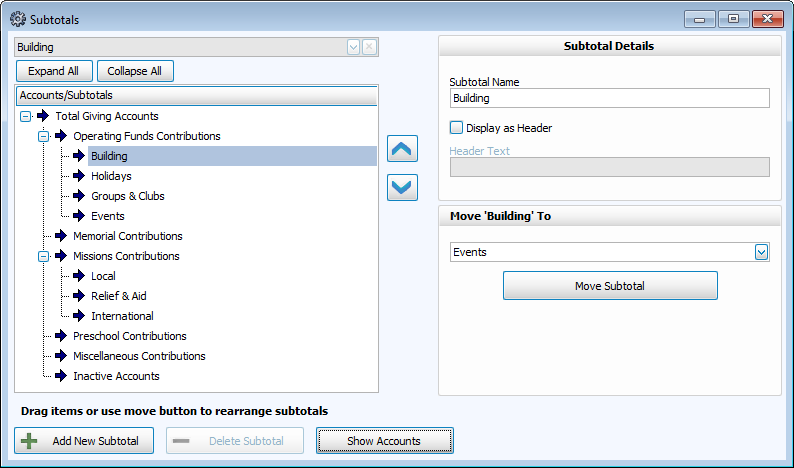
Subtotals can be arranged as a hierarchy as shown above.
-
Click
 to add a subtotal. Move it by clicking and dragging the name under the correct subtotal. You can also select it's parent from the dropdown in the lower right and click
  .
. -
Show only subtotals by clicking
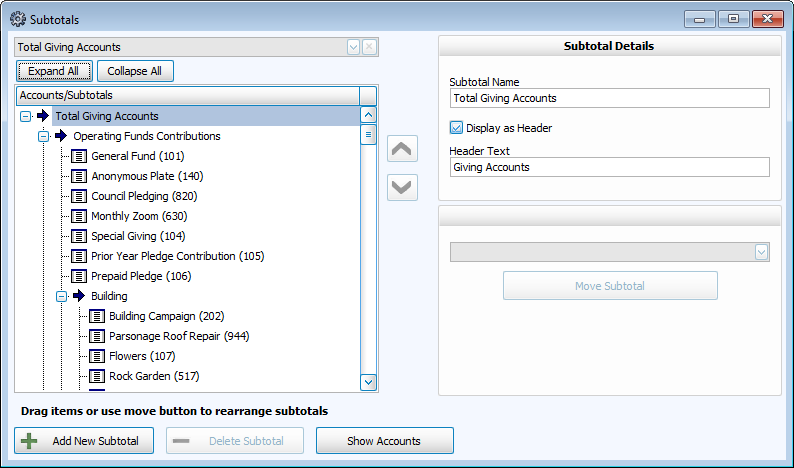
 . Display the giving accounts making each subtotal by clicking
  .
.
-
Move accounts by clicking and dragging the name. You can also select the Subtotal it belongs to from the dropdown in the lower right and click
 .
.