Skills & Interests
Skills and Interests allow you to tag people with codes that indicate their talents.
Access Setup Skills
To access from the Button Bar, go to Groups/Skills > Setup Skills

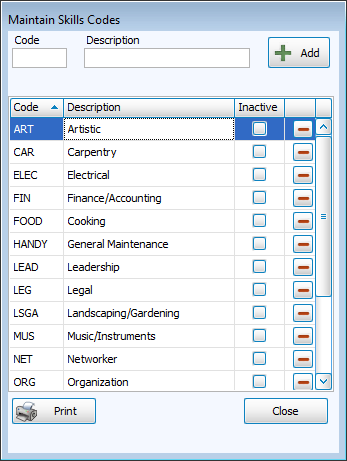
Click  to produce a print preview of codes and descriptions.
Add New Codes
-
Click
 to open Maintain Skills Codes.
 -
Enter a short code and description.
-
Click
 .
.
Edit Codes
-
Click
to open Maintain Skills Codes. -
Highlight the field to edit and type your changes.
Make Codes Inactive
Making a code Inactive keeps the code in places where it's already been entered, but changes the text to red and asks to confirm if it's assigned.
-
Click
to open Maintain Skills Codes. -
Check the box in the Inactive column.
Remove the check to make the code active again.
Delete Codes
-
Highlight the name of the field to delete.
-
Click
 .
. -
If that code is assigned to anyone, you'll be asked to confirm the deletion with the warning that it will clear the places it's currently listed.